


Nutrislice
4.1620.00 Reviews
App Specs
- Version
- 5.32
- Updated On
- License
- Free
- Downloads
- 100,000+
- Developer
- Nutrislice, Inc.
- Categories
- Food & Drink
- Platform
- Android
Screenshots
 Analysis by AppCompare
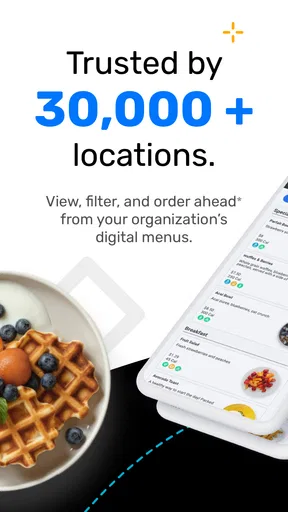
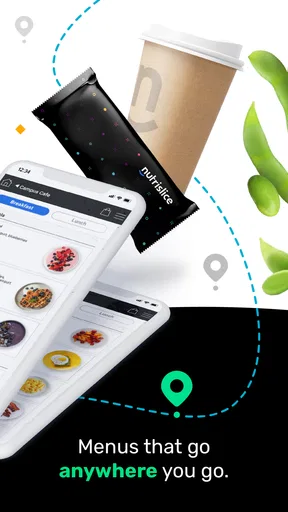
When I need to decide what to eat in a school, workplace, campus, or other participating location, the hardest part is often not choosing between meals. It is finding a current menu before I arrive. Nutrislice is built around that practical problem: it brings digital menus and ordering information from participating locations into one mobile experience. I found it most useful when my meal decision depended on what was being served that day rather than on a general restaurant search.
This is a free Food & Drink app from Nutrislice, Inc., available to everyone and supported on Android versions starting with 5.0. It has been around since February 7, 2013, and the current version is 5.32. Its average rating is 4.1 from around 1.5 thousand ratings, with over 100 thousand installs, so it has a meaningful user base without feeling like a universal replacement for every food-ordering service.
How Nutrislice feels when the menu depends on a connection
The app makes the most sense when the menu is changing and I want to check it close to the time I plan to eat. That immediately makes connectivity part of the experience. A menu is useful only if the app can reach the relevant location and retrieve the information being presented. When the connection is reliable, the process is pleasantly direct: I can look for a participating place, inspect the available menu information, and make a decision before standing in line or walking across a large site.
That convenience is different from using a normal recipe app or a restaurant directory. Those tools are often designed around permanent menus, saved dishes, or broad discovery. Nutrislice is more useful for an institution or venue that publishes its own food information digitally. In that setting, the important question is not “What restaurants are near me?” but “What can I get at this specific location today?”
I would not treat it as a universal food database. Its usefulness depends on whether the place I care about participates and maintains its digital menu. The app can be installed anywhere, but that does not mean every cafeteria, school dining room, office restaurant, or public venue will appear with equally useful information. This is the first trade-off to understand: the experience can be much more focused than a general food app, but it is also tied to the locations supported by the service.
On a strong connection, the app is a practical planning layer rather than entertainment. I can check options before leaving a classroom, office, or dorm room and avoid making the trip blindly. That small change matters most when the location is spread across several buildings or when meal breaks are short. It also helps when I am choosing between eating immediately and waiting for a later service period.
Why the mobile setting matters
Nutrislice is at its best on the move, but “mobile” does not always mean “effortless.” I found the most sensible workflow was to check the menu before entering a crowded dining area, while I still had time to compare choices. Trying to browse while walking, carrying a tray, or standing in a queue is less comfortable. A quick check beforehand turns the app into a planning tool instead of something I have to operate under pressure.
Worth Reading Before You Choose

EA SPORTS FC Mobile 26 Is a Bigger Football Game, but It Takes Time

Flipboard Shows What News Apps Must Do Beyond the Feed

Switching to Android Auto Means Rethinking Your Driving Routine

Google Calendar Makes a Crowded Week Easier to Manage

Ludo King Makes the Most of the Minutes Between Plans

Baby Panda World Brings Quick Play to Modern Phones, but Its Game Library Feels Busy
A realistic example is a workday lunch. I might have only a short break and several possible food locations nearby. Rather than walking to the first one and hoping it has something suitable, I can use Nutrislice to inspect the participating menus first. If one location looks more appropriate, I can head there directly. If the information suggests that another option is better for a later meal period, I can adjust my timing before wasting the trip.
The same workflow can help a student deciding where to eat between classes. A large campus often makes an unsuccessful food run more costly than it sounds. The walk takes time, the queue may be long, and returning for a different option may not be realistic. Checking the menu in advance does not remove those constraints, but it improves the decision I make before committing to them.
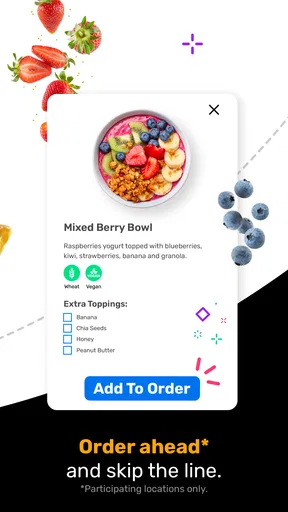
There is also a useful distinction between browsing and ordering. Nutrislice is associated with digital menus and ordering at participating locations, but I would not assume that every location offers the same level of interaction. Some users may mainly need menu visibility, while others may encounter ordering options where the venue supports them. I would check the particular location inside the app rather than expecting a uniform ordering flow everywhere.
This matters if I am comparing it with a familiar delivery platform. Delivery apps usually make ordering, payment, delivery areas, and restaurant discovery central to the experience. Nutrislice is more location-specific. It can be the better choice for checking an institutional menu, but a conventional delivery app is likely more suitable when I want to browse independent restaurants, compare delivery fees, or send food to an address.
What happens when the connection is weak
The most important limitation is that a digital menu service naturally depends on reaching current information. If I am in a basement, a crowded building, or an area with unstable mobile service, I should not plan as though the app will always be ready at the exact moment I need it. I would check the relevant menu while connected and leave myself a little flexibility rather than waiting until I am already at the counter.
This is not just a technical annoyance. A menu can be time-sensitive, and a delayed or incomplete view can affect a real decision. If I am choosing a place specifically because of one expected item, I would treat the app as a helpful source for planning, not as a guarantee that the item will still be available when I arrive. Food service can change during the day, and the app cannot make an unavailable item appear on the serving line.
My practical habit would be to open the location and menu before leaving a dependable connection. I would note the venue and the most relevant choice instead of assuming I can reload everything later. This is one of the less obvious ways to use the app well: use connectivity for preparation, not only for last-second searching.
If a page does not load, I would first confirm that I selected the intended location rather than repeatedly refreshing the same screen. A large organization may have several dining areas, and choosing the wrong one can look like a missing-menu problem. I would also retry from a more reliable connection before concluding that the location has no useful information. That simple recovery sequence avoids confusing a network issue with a content issue.
When the app does not immediately solve the problem, the fallback is straightforward but less convenient: use the venue’s posted menu, ask staff, or choose a familiar alternative. That is why I would not recommend relying on Nutrislice as the sole plan for a time-critical meal. It is a strong aid when available, but a physical menu or direct confirmation remains valuable when the decision has consequences.
Using it without wasting mobile data
For most people, checking a menu is unlikely to be a major data task, but repeated browsing can still be inconvenient when the connection is limited. I would avoid opening the app over and over while moving between weak signal areas. Instead, I would decide which locations matter, check them once when the network is stable, and use that information to plan the trip.
This approach also makes the app feel faster in practice. Rather than treating it like a social feed that needs constant refreshing, I use it in short sessions: identify the location, review the menu, compare the realistic choices, and close it. That pattern is especially useful for someone with a restricted mobile plan or an unreliable connection.
There is a trade-off between freshness and convenience. The closer I check to mealtime, the more current the information may be; the earlier I check, the less likely I am to be caught without access later. I would use an early check for broad planning and a final quick check when I have a dependable connection. I would not repeatedly refresh just to chase minor changes unless the meal choice is particularly important.
Privacy-conscious users may also prefer a deliberate approach to location discovery. Rather than expecting the app to solve every search automatically, I would select the organization or venue I actually intend to visit and inspect only the relevant menus. That reduces unnecessary browsing and keeps the experience focused. The app’s value comes from narrowing the decision, not from endlessly exploring every possible food option.
Who gets the most value from the app
I think Nutrislice is a good fit for people who regularly eat at participating institutions and want menu information before arriving. Students, employees, parents checking a school food program, and visitors to large venues can all benefit when the same locations are used repeatedly. The more familiar I am with the venue, the more useful the app becomes because I can turn menu information into a routine decision.
It is particularly helpful for planning around a schedule. Someone moving between classes or meetings can check options in advance and avoid spending the whole break searching. A person with specific food preferences may also appreciate seeing the available choices before making the trip, although I would still read the displayed information carefully and confirm details with staff when the consequences of a mistake are serious.
The app is less compelling for someone who mainly wants restaurant discovery across an entire city. If my priority is comparing independent restaurants, reading broad customer feedback, arranging delivery, or finding promotions, I would probably choose a general restaurant or delivery service instead. Nutrislice’s strength is not being everything at once; it is connecting users with menus and ordering experiences from participating locations.
I would also hesitate to recommend it as the only tool for someone who rarely visits supported venues. Installing a free app has little downside, but its usefulness will feel limited if the places I eat do not appear or if I only need a menu once. In that case, a venue’s own website, a posted menu, or a general search may be quicker.
Small habits that make the experience better
My first tip is to identify the exact location before judging the menu. When several dining areas belong to the same organization, the difference between them can be more important than the difference between two dishes. Selecting the correct venue prevents wasted travel and gives the app a fair test.
My second tip is to use the app before the meal rush rather than during it. A stable connection and a quiet moment make it easier to compare options, notice ordering details, and decide whether the location is worth visiting. This also reduces the temptation to make a rushed choice because the app is being used one-handed in a crowded line.
My third tip is to separate menu planning from availability guarantees. I use the displayed information to choose a likely destination, but I keep a backup in mind. That is especially sensible when the menu determines whether I can eat within a short break. The app improves the odds of a good decision; it does not remove the unpredictability of food service.
A fourth useful habit is to treat connection failure as a workflow problem, not just an app problem. I check the menu earlier, retry from a stronger network, verify the selected location, and then use a posted menu or staff confirmation if necessary. This sequence is more reliable than repeatedly tapping refresh while standing at the counter.
Finally, I would judge the app by repeated usefulness rather than by one successful search. If it consistently helps me plan meals at a location I visit often, it earns a place on my phone. If it rarely has a relevant venue, its free price does not make it especially valuable; unused convenience is still clutter.
My connectivity verdict
Nutrislice is a focused Food & Drink app that makes the most sense when digital menus or ordering information from a participating location can save me a wasted walk, a rushed decision, or an unnecessary queue. I like it as a planning companion for campuses, workplaces, schools, and similar environments where the menu changes and the venue matters as much as the food itself.
The connection-dependent nature of the experience is both its purpose and its main weakness. When the network is available and the right location is covered, the app can make mobile meal planning much easier. When service is unreliable, I need a backup and should check important information early. I would not use it as a replacement for every restaurant app, nor as a promise that a listed item will remain available.
For me, the deciding question is simple: do I regularly eat at places that use Nutrislice? If yes, the free app is worth trying because its value grows with repeated visits and better planning habits. If not, a general restaurant search or direct venue menu may be more practical. Overall, Nutrislice is best when I use it proactively, while connected, to make a specific meal decision rather than expecting it to function as a complete food-discovery service.
Pros
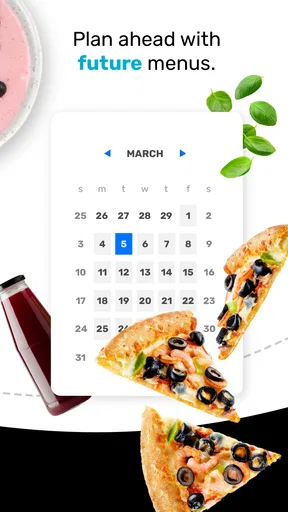
- Menus are easy to browse by date
- meal period
- and location.
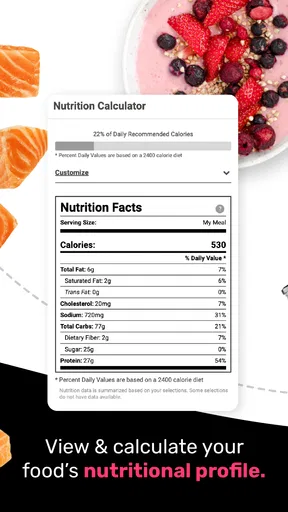
- Nutrition details support more informed food choices.
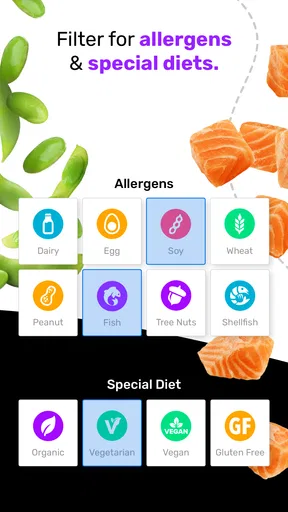
- Allergen information is clearly presented where available.
- Favorites make it quicker to find frequently viewed meals.
- Useful for checking options before arriving at the cafeteria.
Cons
- Information depends on each institution keeping its menus updated.
- Some locations may show incomplete nutrition or allergen data.
- The app is less useful if your school or workplace is not supported.
- Menu loading can vary with network quality and server availability.
- Portion sizes and ingredient details may not always be provided.
FAQs for Nutrislice
What is Nutrislice and what can I use it for?
Nutrislice is a digital menu and meal-information platform commonly used by schools, universities, workplaces, and other organizations. It lets users browse available meals, view menus by date and location, and check nutritional details, ingredients, allergens, and dietary labels when provided by the organization. The exact features and menu accuracy depend on the institution using Nutrislice.
Can Nutrislice help me identify allergens and dietary information?
Yes, Nutrislice can make it easier to identify common allergens, ingredients, nutrition facts, vegetarian or vegan options, and other dietary information. However, the information is supplied by the participating school, restaurant, or organization, so it may vary in completeness and accuracy. Anyone with a serious allergy should still confirm ingredients directly with food-service staff before eating.
Does Nutrislice allow me to order or pay for meals?
Nutrislice is primarily designed for viewing menus and meal information, but some participating organizations may enable additional features such as meal ordering, pickup details, account services, or payment-related options. These functions are not available everywhere. After selecting your institution or location, check whether ordering or payment tools appear, because availability depends entirely on the organization’s setup.
Is Nutrislice free to download and use?
The Nutrislice app is generally free for users to download and browse, although the organization providing the menus may operate its own meal plans, cafeteria charges, subscriptions, or ordering fees. Installing the app does not necessarily mean that meals are free. Review the pricing, payment, and account policies of your school, workplace, or other participating food provider before making an order.
How do I find my school, workplace, or dining location in Nutrislice?
After opening Nutrislice, you typically search for and select the school, district, workplace, campus, or dining location connected to your account or area. Once selected, the app displays the menus and services published by that organization. If your location cannot be found, it may not use Nutrislice, may be listed under a different name, or may not have published current menus yet.


